![V-logo_new.png]](https://help.veremark.com/hs-fs/hubfs/V-logo_new.png?height=40&name=V-logo_new.png)
The Reviewed/Completed Date Interval filter allows you to filter candidates based on the date a check or request was reviewed or completed.
This feature allows you to easily view all completed and reviewed checks within a specified date range, regardless of their original request dates. This guide provides step-by-step instructions on how to use the Reviewed/Completed Date Interval filter to help you find the information you need more efficiently.
Step 1: Access the Client Portal
To begin, log in to your client portal using your credentials. Once logged in, you will have access to your dashboard and the various features.
Step 2: Locate the "Reviewed/Completed Date Interval" Filter
On the dashboard or the relevant page where you access your checks, you will find the "Reviewed/Completed Date Interval" filter. It will be prominently displayed for your convenience.
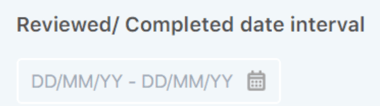
 Step 3: Select the Date Range
Click on the "Reviewed/Completed Date Interval" filter to open it. You will see two date fields - "Start Date" and "End Date." Here's how to use them:
-
Start Date: Choose the beginning date of the period you want to review.
-
End Date: Select the end date of the period you want to review.
Step 4: Apply the Filter
Once you have entered your desired start and end dates, click the "Apply" button. The system will now retrieve and display all completed and reviewed checks within the specified timeframe, regardless of their original request date.
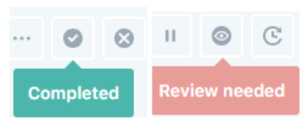
If you just need to check the Reviewed or the Completed cases, you can apply this filter along with the existing filter icons on top of the Requests page.

Step 5: Export Filtered Checks (Optional)
If you wish to export the filtered checks for further analysis, you can do so easily. Look for the export option, which may be labeled as "Export to CSV" or a similar term. Click on this option to download a CSV report containing the filtered checks.
Step 6: Real-time Updates
The system provides real-time updates for check statuses. This means that any changes or updates to check statuses will be immediately reflected in the filtered results and the CSV report if you have exported it.
Need Help?
If you have any questions, need further clarification, or encounter any issues while using the Reviewed/Completed Date Interval filter, please contact our Client Support team. We're happy to help.